It clearly identifies the target audience and promises a specific, high-value list of tools, creating an immediate curiosity gap for anyone in the industry.
Slide Text
Platforms I use every day as a creative director & social media manager
Visual
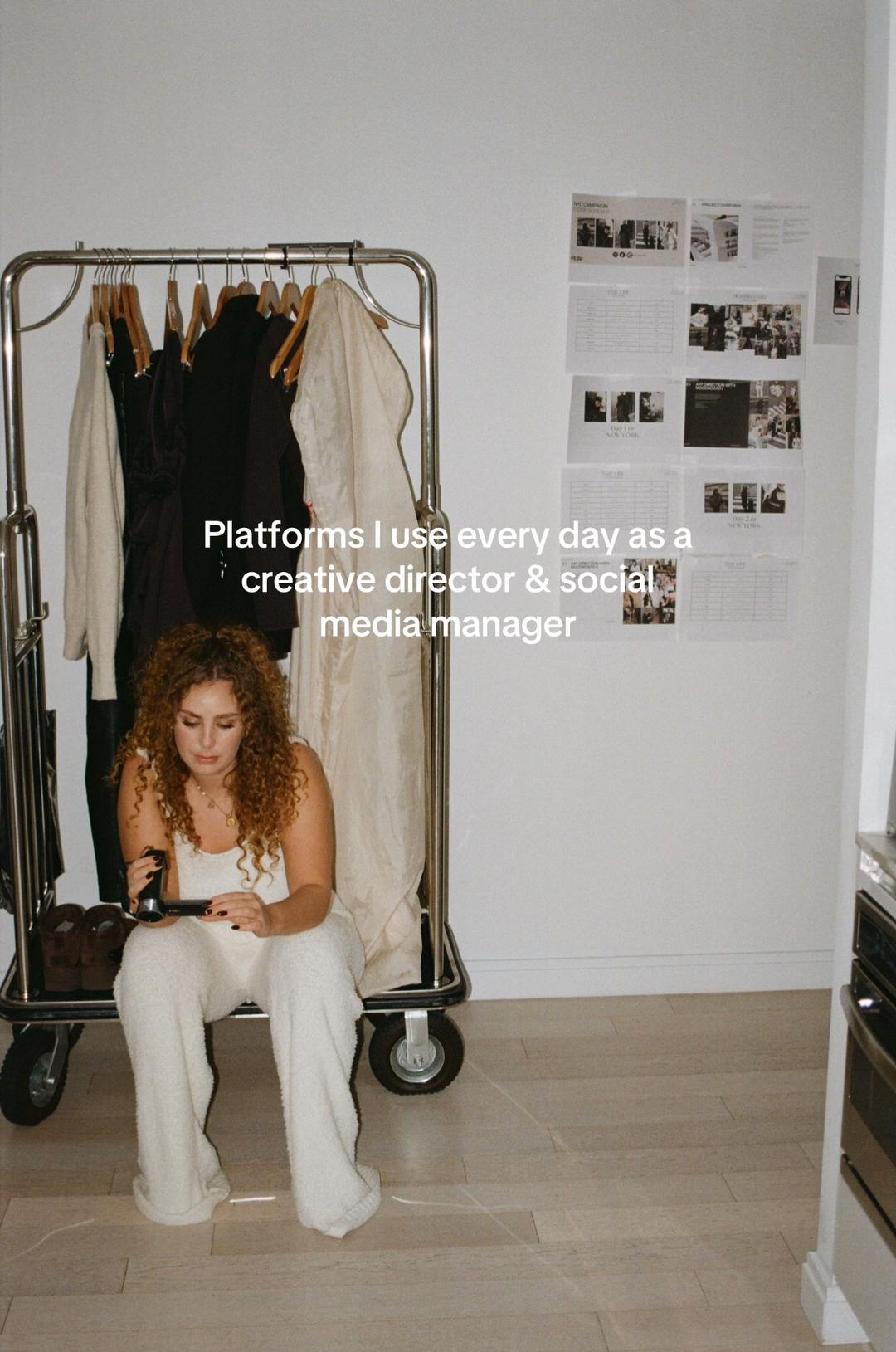
Creator sitting on a rolling clothing rack in a minimalist studio, holding a camera, surrounded by mood boards.
All Slides
@charelgijzen carousel breakdown
Charel Gijzen
#creativedirector #creativeagency #cometoworkwithme #socialmediamarketing #digitalmarketing #businessowner #campaign
Effectiveness score
9/10
Views
403.8K
Likes
49.6K
Saves
28.9K
Engagement
20.0%
Hook
Platforms I use every day as a creative director & social media manager
Goal
build-community
Offer
information
CTA
none
Caption
#creativedirector #creativeagency #cometoworkwithme #socialmediamarketing #digitalmarketing #businessowner #campaign
Strategic Summary
This carousel achieves virality through extreme utility masked as aspirational lifestyle content. The 12x bookmark rate confirms it functions as a digital toolset for aspiring creative directors. By pairing high-end aesthetic visuals with practical software recommendations and a visible template system, it triggers both 'save for later' utility behavior and 'I want this career' aspiration.
The Winning Formula
High-status professional identity + visual proof of workflow + shareable template system = massive save-rate utility.
What's working
- •Slide 1 establishes immediate authority ('Creative Director & Social Media Manager') while the visual (fashion rack, mood board) signals the aspirational lifestyle associated with that role.
- •Slides 4 and 5 provide a 'peek behind the curtain' at a tangible system (the Google Sheet planner), which drives the exceptional 7.17% bookmark rate as users save it to replicate the organization.
- •The aesthetic consistency—clean white spaces, Apple products, and high-fashion imagery—makes boring software tutorials feel like luxury content, increasing perceived value.
- •Showing the actual interfaces (Slides 2, 3, 7) provides social proof that the creator actually does the work, rather than just talking about it.
What's not working
- •Slide 8 lacks a clear Call to Action or summary text; it ends on a silent image which may cause a drop-off right before the loop or profile visit.
- •Slides 6 and 7 overlap significantly in topic (Adobe programs), creating a slight pacing drag in the middle of the carousel.
Viral lesson
Utility scales when wrapped in aspiration. People don't just want to know what tools to use; they want to feel like the person who uses them. Show the tool, but dress it in the lifestyle of the expert.
Can a small creator replicate this? Highly replicable for any service-based freelancer or agency owner. Prerequisite: You must have a visually polished workflow (templates, decks, or software setups) and the ability to photograph screens in an aesthetically pleasing environment.
Structural Formula (steal-the-format)
Structure pattern
Identity hook -> Tool 1 -> Tool 2 -> Core Template Reveal -> Template Deep Dive -> Tool 3 -> Tool 4 -> Silent Outro
Copy formula
First-person list of tools + specific use-case descriptor per tool
What to swap (concrete remixes)
- •Swap 'Creative Director' for 'Video Editor' showing Premiere/After Effects + LUT packs for filmmakers.
- •Swap for 'Web Developer' showing VS Code extensions + Figma wireframes + Notion docs for tech freelancers.
- •Swap for 'Event Planner' showing venue scouting photos + budget spreadsheets + vendor contact lists.
What NOT to copy
Do not copy the silent last slide; always end with a CTA or summary to capture the engagement momentum you built in the middle slides.
Aesthetics
Clean, high-fashion creative director workspace with white sans-serif text overlays and Apple product integration.
Color palette
What it conveys: The overall aesthetic conveys organized luxury and professional competence, making the viewer feel that using these tools will elevate their own work to a high-end level.
Slide-by-slide forensics
1hookmedium shotaspirational professionalworks:yesgrab:85/100aesthetic:90/100Platforms I use every day as a creative director & social media manager
Platforms I use every day as a creative director & social media manager
Visual description
A woman with curly hair sits on the base of a metal clothing rack filled with garments. She holds a small black device. Behind her is a white wall with a grid of pinned papers/mood board elements. The lighting is soft and natural. The aesthetic is minimalist fashion studio.
Scene setting
minimalist fashion studio / creative workspace
Visible people
Visible objects
vs prior slide
Predicted audience reaction
Aspiring creatives will immediately identify with the title and aspire to the lifestyle shown, prompting a swipe to see the 'secret tools'.
Verdict: Strong identity hook combined with a visual that screams 'creative director' authority.
2step in listscreenrecordinginformativeworks:yesgrab:80/100aesthetic:70/100Adobe Illustrator to create feed overviews
Adobe Illustrator to create feed overviews
Visual description
Close-up of a MacBook screen displaying Adobe Illustrator. The canvas shows a 3x3 grid of images being arranged as a social media feed overview. The dock at the bottom reveals a heavy workflow of design and communication apps.
Scene setting
laptop screen close-up
Visible objects
Products on screen
Other text elements
- •Adobe Illustrator 2024 interface
- •Dock icons: Chrome, Outlook, Photos, Calendar, InDesign, Slack, App Store, Canva, Drive, InDesign, WeTransfer
vs prior slide
Style: Shifts from lifestyle portrait to screen capture, but maintains the white/clean aesthetic of the software.
Story: Moves from the general promise of 'platforms' to the first specific tool.
Predicted audience reaction
Designers and planners will recognize the utility of using Illustrator for feed planning, validating the creator's expertise.
Verdict: Provides immediate, actionable value by naming a specific tool and its specific use case.
3step in listscreenrecordingprofessionalworks:yesgrab:80/100aesthetic:85/100Capture One on set days
Capture One on set days
Visual description
A vertical monitor displays Capture One software showing a high-fashion portrait of a model. The surrounding environment is dark, suggesting a studio setting with cables visible on the desk.
Scene setting
dark studio environment
Visible people
Visible objects
Products on screen
Other text elements
- •Capture One interface
- •Model portrait on screen
vs prior slide
Style: Similar screen-capture format but darker mood, emphasizing the 'on set' context.
Story: Continues the list of tools, moving from planning (Illustrator) to production (Capture One).
Predicted audience reaction
Photographers and high-end content creators will nod in agreement, recognizing Capture One as the industry standard.
Verdict: Reinforces the 'Creative Director' authority by showing professional-grade software used on set.
4payoffscreenrecordingorganizedworks:yesgrab:95/100aesthetic:75/100My Social Media Calendar Template
The overview of the social media planner
My Social Media Calendar Template The overview of the social media planner
Visual description
Laptop screen showing a detailed Google Sheet titled 'Stellar Whispers Social Media Content Calendar'. It features a monthly calendar, metrics for agreed posts, important dates, and a visual grid of the December Instagram feed on the right side.
Scene setting
laptop screen close-up
Visible objects
Products on screen
Other text elements
- •Stellar Whispers Social Media Content Calendar & Planner 2024
- •December Content Planner
- •Calendar grid
- •Agreed Posts
- •Important Dates
- •Monthly To-Do List
vs prior slide
Style: Continues the screen-capture format, focusing on the organizational aspect of the workflow.
Story: Reveals the core asset—the template system—which is the main driver for saves.
Predicted audience reaction
High save intent. Users will want to bookmark this slide to reference the structure of the calendar or look for a link to the template.
Verdict: This is the utility peak. The visible template structure triggers the 'I need this organization' response.
5proofscreenrecordingdetailedworks:yesgrab:90/100aesthetic:70/100the social media planner
the social media planner
Visual description
Zoomed-in view of the Google Sheet, showing the detailed rows for individual posts. It displays image placeholders, caption text boxes, and CTA/Link fields, demonstrating the granularity of the planning system.
Scene setting
laptop screen close-up
Visible objects
Other text elements
- •Stellar Whispers Social Media Content Calendar & Planner 2024
- •Post image placeholders
- •Caption fields
- •CTA/Link fields
- •Google Drive links
vs prior slide
Style: Same visual style, drilling down deeper into the template introduced in Slide 4.
Story: Provides a closer look at the template, proving its comprehensiveness.
Predicted audience reaction
Further reinforces the value of the template. Users likely screenshot this specific layout to copy the column structure.
Verdict: Essential for users who want to replicate the system; it shows the 'how' not just the 'what'.
6breatherlifestyle shotlifestyleworks:partialgrab:75/100aesthetic:90/100Lots of Adobe programs:
mostly Illustrator & InDesign
Lots of Adobe programs: mostly Illustrator & InDesign
Visual description
Laptop sitting on a wooden table in a stylish cafe/lounge with white chairs and a wooden ceiling. The screen shows Adobe Illustrator with a mood board. A phone with an 'ENTIRE SOCIALS' case lies next to the laptop.
Scene setting
stylish cafe / co-working space
Visible people
Visible objects
Products on screen
Other text elements
- •Adobe Illustrator 2023 interface
- •Phone case: ENTIRE SOCIALS
vs prior slide
Style: Shifts from tight screen capture to a wider lifestyle shot, re-establishing the 'cool agency owner' vibe.
Story: Broadens the scope from the specific template back to the general Adobe ecosystem.
Predicted audience reaction
Provides a moment of aesthetic appreciation and reinforces the brand identity ('Entire Socials').
Verdict: Visually pleasing but content-wise redundant with Slide 2; serves more as lifestyle padding.
7step in listscreenrecordingtechnicalworks:yesgrab:70/100aesthetic:75/100Indesign for creating production decks
Indesign for creating production decks
Visual description
Screen capture of Adobe InDesign showing a production deck with black and white fashion images. The sidebar shows multiple pages and spreads, indicating a comprehensive document.
Scene setting
laptop screen close-up
Visible objects
Products on screen
Other text elements
- •Adobe InDesign 2024 interface
- •TestShoot_SW_Productiondeck.indd
- •Page thumbnails sidebar
vs prior slide
Style: Returns to screen capture format but focuses on a different Adobe tool.
Story: Adds another tool to the list, specifically for client-facing deliverables.
Predicted audience reaction
Agency owners will relate to the necessity of production decks, adding to the creator's credibility.
Verdict: Good specific use case that rounds out the software list, though less universally applicable than the calendar.
8fillerscreenrecordingminimalworks:nograb:50/100aesthetic:80/100
Visual description
Screen capture of Adobe InDesign showing a 2x2 grid layout with fashion images: a black glove, a model in black, a model in white, and a black beaded necklace. No overlay text.
Scene setting
laptop screen close-up
Visible objects
Other text elements
- •Adobe InDesign 2025 interface
- •Stellar Whispers planning February.indd
- •Image frames with gloves, model, necklace
vs prior slide
Style: Consistent InDesign screen capture style.
Story: No narrative progression; merely shows more of the same software without new information.
Predicted audience reaction
Users may stop engaging here as there is no new information or text to read.
Verdict: Fails to provide a CTA or summary; ends the carousel on a weak note with no text.
Commerce intent
Mentioned products
Comment ethnography
The audience consists of aspiring social media managers and junior creatives looking to professionalize their workflow and emulate the 'cool agency owner' aesthetic.
Diagnostics
Hook deep-dive
Platforms I use every day as a creative director & social media manager
The viewer swipes to discover the specific 'insider' tools that allow someone to hold such a prestigious and creative job title.
Engagement read
The bookmark rate is 12x the library norm, indicating this is consumed as a resource rather than entertainment.
Mechanics
The promise of a complete 'toolkit' keeps users swiping to see every app and template mentioned in the hook.
Brand & funnel
Brands visible
Buying-journey moment: The viewer is considering how to professionalize their own workflow and is looking for a system to adopt.
Ideal Customer Profile
Aspiring or junior social media managers and creative directors who admire the 'that girl' aesthetic and want to professionalize their workflow.
Age
18-24
Gender
female
Readability
simple
Interests
Pain Points
Aspirations
Emotional Profile
Primary Emotion
aspirationIntensity
Effectiveness
Emotions Evoked
Emotional Arc
curiosity → professional validation → educational satisfaction
Why It Lands
The content makes the viewer feel like they are getting a 'behind-the-scenes' look at a successful career, which triggers both inspiration and the desire to emulate the creator's professional habits.
Writing Analysis
Style
listicle
Tone
aspirational
Hook Type
identity statement
Quality
The writing is concise and functional. It avoids fluff, focusing entirely on delivering the promised information, which respects the viewer's time.
Effectiveness
Goal Achievement
The massive bookmark-to-view ratio confirms the content succeeded as a high-value resource. It effectively established the creator as an authority in the creative space.
Why It Spread
high-value 'saveable' content (tool list)
aesthetic consistency that aligns with the target audience's visual preferences
clear, non-clickbait promise fulfilled immediately
Content DNA
There is no explicit CTA, which is a missed opportunity for lead generation, though it keeps the content feeling purely educational and non-salesy.
Narrative Arc
The carousel maintains a steady rhythm of 'Tool Name' + 'Visual Evidence', keeping the viewer engaged through the entire slide deck.
Psychological Blueprint
Why It Spread
The post spread because it perfectly bridges the gap between 'aspirational lifestyle' and 'actionable utility.' By showing the actual, high-end creative work (the 'what') alongside the tools used to create it (the 'how'), it provides immense value to a specific niche while satisfying the voyeuristic desire to see how a professional works. The 19.99% engagement rate is driven by the high save count, as viewers bookmark the post as a 'resource' for their own career development.
Framework
authority then teachPrimary Tactic
authorityTactics Used
authority signaling via professional software screenshots on slides 2, 3, 4, 5, 6, 7, 8
identity-signaling through the 'creative director' label on slide 1
curiosity-gap via the promise of 'platforms I use' on slide 1
social-proof-stack through the high-end, editorial visual style of the work shown
Cognitive Biases
halo effect: the high-quality aesthetic of the work implies the creator is an expert
authority bias: using industry-standard tools like Adobe Illustrator and Capture One validates the creator's status
Tribal Markers
Trust Signals
Slide Breakdown (2 analyzed)
Hook Analysis
It clearly identifies the target audience and promises a specific, high-value list of tools, creating an immediate curiosity gap for anyone in the industry.
Text
Platforms I use every day as a creative director & social media manager
Visual
Creator sitting on a rolling clothing rack in a minimalist studio, holding a camera, surrounded by mood boards.
Visual Elements
Color Palette
Copy Analysis
Power Words
Open Loop: yes, the reader wants to know which specific tools are used.
Visual Psychology
Attention: the creator's face and the central text
Gaze: creator looking down at the camera, drawing the eye to the tool in hand
Emotional cue: the 'cool, busy creative' vibe
Composition: to establish authority and relatability simultaneously
Text
Adobe Illustrator to create feed overviews
Visual
Laptop screen showing an Adobe Illustrator interface with a grid of images.
Visual Elements
Color Palette
Copy Analysis
Power Words
Open Loop: yes, keeps the viewer swiping to see the next tool.
Visual Psychology
Attention: the grid of images on the screen
Emotional cue: professionalism and organization
Composition: to show the 'how' behind the aesthetic
Comment Intelligence
Sentiment
PositiveResonance
Intent
build-community
Audience Vibe
Professional and appreciative, with users tagging peers to share the resources.
Standout Quotes
“This is exactly what I needed to see today.”
“Saving this for my own workflow!”
“The aesthetic is so clean, love this process.”