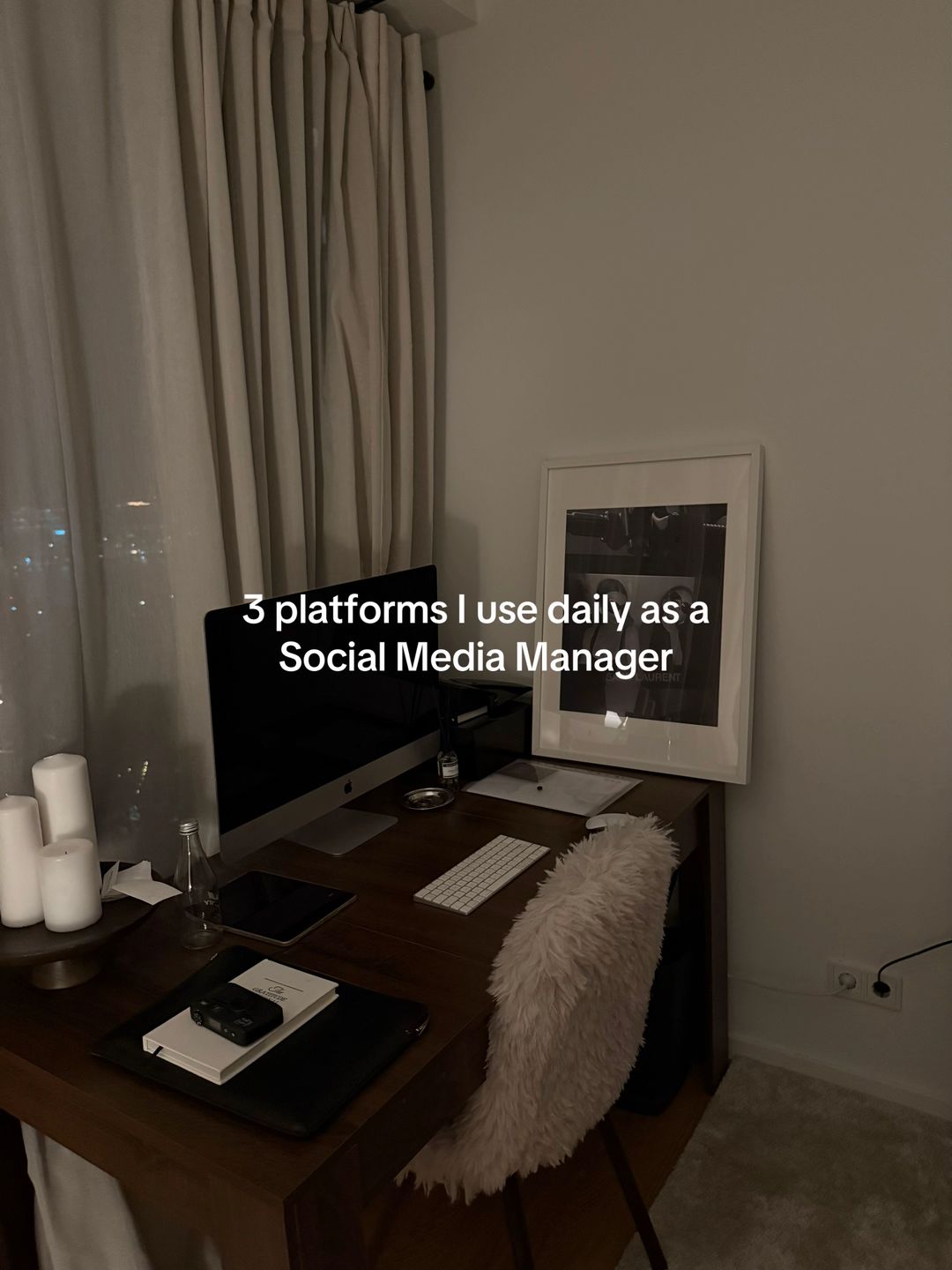
It uses a classic 'listicle' hook that promises a specific, actionable benefit for a specific professional identity.
Slide Text
3 platforms I use daily as a Social Media Manager
Visual
A dark, moody, minimalist desk setup at night with a computer, candles, and a framed print.
All Slides
@charelgijzen carousel breakdown
Charel Gijzen
#creativedirector #creativeagency #socialmediamanager #smm #comewithmetowork #marketing
Effectiveness score
9/10
Views
284.3K
Likes
26.9K
Saves
17.7K
Engagement
16.1%
Hook
3 platforms I use daily as a Social Media Manager
Goal
build-community
Offer
information
CTA
none
Caption
#creativedirector #creativeagency #socialmediamanager #smm #comewithmetowork #marketing
Strategic Summary
This carousel went viral primarily due to an extreme bookmark rate (10.3x norm), signaling it functions as a saved reference library rather than passive entertainment. The hook leverages professional authority ('platforms I use daily') to promise insider access to a successful workflow. Slide 3 (Google Sheets calendar) is the specific value anchor that triggers the save behavior, while the moody, high-end desk aesthetic validates the creator's competence before the user even reads the tools.
The Winning Formula
Professional authority claim + aesthetic proof of workspace + specific tool breakdown with save-bait workflow.
What's working
- •Slide 1 establishes immediate credibility with a clean, high-end desk setup that matches the 'Creative Director' identity claim.
- •Slide 3 offers a tangible, replicable system (Google Sheets calendar) that solves a universal pain point (organization), driving the 10x bookmark rate.
- •The '3 platforms' listicle structure creates a low-friction completion bias — users know exactly how long the swipe journey is.
- •Text overlays are concise and functional, respecting the user's time while delivering high-density information on screen.
What's not working
- •Slide 2 (InDesign) and Slide 4 (Google Presentations) receive significantly less comment engagement than Slide 3, suggesting they are perceived as 'filler' compared to the calendar hack.
- •No direct Call-to-Action (CTA) to claim the template in the caption or final slide, leaving monetization potential on the table despite high demand in comments.
Viral lesson
Utility content disguised as lifestyle aesthetic creates a 'double-dip' value proposition: users save for the tool, but follow for the vibe.
Can a small creator replicate this? Highly replicable for any knowledge worker; requires only a clean workspace photo and a screen recording of your actual software workflow, no fancy production needed.
Structural Formula (steal-the-format)
Structure pattern
4-slide list: Hook (Identity + Number) -> Tool 1 (Pro Cred) -> Tool 2 (Value Anchor) -> Tool 3 (Workflow Complete).
Copy formula
Tool Name — specific use case description (second-person implied benefit).
What to swap (concrete remixes)
- •Swap 'Social Media Manager' for 'Real Estate Agent' and showcase CRM, Email, and Contract tools.
- •Swap 'Social Media Manager' for 'Student' and showcase Note-taking, Research, and Study apps.
What NOT to copy
Do not copy the specific tools (InDesign/Sheets) if they don't match your actual workflow; the authenticity of the screen screenshots is what builds the trust required for the save.
Aesthetics
Moody professional creative; dark tones, wood textures, and screen-focused imagery.
Color palette
What it conveys: The aesthetic conveys a sense of calm, high-end productivity that makes the work feel manageable and stylish rather than chaotic.
Slide-by-slide forensics
1hookwide shotcalm professionalismworks:yesgrab:85/100aesthetic:90/1003 platforms I use daily as a Social Media Manager
3 platforms I use daily as a Social Media Manager
Visual description
A moody, low-light shot of a home office desk. Features a white iMac, white keyboard, three white pillar candles on a tray, a framed black-and-white photo, and a chair with a white faux-fur throw. Curtains are drawn in the background with city lights peeking through.
Scene setting
minimalist home office at night
Visible objects
Products on screen
Predicted audience reaction
Immediate recognition of the 'aesthetic workspace' trope combined with curiosity about the specific tools.
Comments reacting to this slide
- "Pause - I'm obsessed with your desk set up 👏"
- "Beautiful desk ! This is your working corner?"
Verdict: Successfully sets the aspirational tone and establishes the creator's credibility before delivering the utility.
2step in listscreenshottechnical competenceworks:partialgrab:60/100aesthetic:70/100Indesign — for production decks, strategies, design
Indesign — for production decks, strategies, design
Visual description
Close-up of a laptop screen displaying the Adobe InDesign interface. The canvas shows a mood board with black-and-white fashion photography arranged in a grid. The dock at the bottom shows various app icons including Canva, Slack, and Chrome.
Scene setting
laptop screen close-up
Visible objects
Products on screen
Other text elements
- •Adobe InDesign 2024
- •TestShoot_SW_Productiondeck.indd
vs prior slide
Style: Shifts from lifestyle wide-shot to functional screen-close-up, maintaining the dark/moody color grading.
Story: Moves from the 'who' (SMM) to the first 'how' (Design tool).
Predicted audience reaction
Validation for designers who use InDesign; confusion for those who only use Canva.
Verdict: Establishes high-level professional cred (InDesign is pro-level), but doesn't trigger the same save urgency as the calendar slide.
3payoffscreenshotorganized clarityworks:yesgrab:95/100aesthetic:85/100Google Sheets — Social media content calendar for all clients
Google Sheets — Social media content calendar for all clients
Visual description
Laptop screen on a wooden table showing a Google Sheet. The sheet is formatted as a visual calendar with images embedded directly into the cells, representing Instagram posts. The layout is colorful and organized by date.
Scene setting
wooden table with laptop
Visible objects
Products on screen
Other text elements
- •Chrome
- •Google Social Media Calendar
- •docx.google.com
vs prior slide
Style: Continues the screen-shot motif but in a brighter, daytime setting.
Story: Delivers the core value proposition (the calendar system).
Predicted audience reaction
High save intent; users recognize this solves their immediate organizational chaos.
Comments reacting to this slide
- "that google sheets content calendar 😮💨"
- "Wait, girl drop that social media content calendar for us 👀"
- "How the heck do you use google sheets for content! I struggle formatting the content when putting images and videos in!"
- "Okay u have to share the google calendar set up"
- "You have to share the soc med calendar templateee :))"
- "Can you share google sheet calendar tutorial? 🙈"
- "Omg can you send this Google sheets template ✨"
- "Google Sheets create a calendar? Waw"
- "omg please share your google sheets secret because thats like magic"
- "can u share template content calender google sheets😔"
Verdict: This is the viral anchor. It visualizes a solution to a common problem (content planning) in a way that looks achievable yet impressive.
4step in listmedium shotcollaborative workflowworks:partialgrab:65/100aesthetic:80/100Google Presentations — To create content creation decks when video is included & shared with team
Google Presentations — To create content creation decks when video is included & shared with team
Visual description
Laptop screen showing Google Slides with a fashion e-commerce deck. A hand with dark nail polish is visible typing on the keyboard. A notebook and pen sit on the table next to the laptop. Lighting is dim/cozy.
Scene setting
cozy workspace at night
Visible people
Visible objects
Products on screen
Other text elements
- •Google Slides interface
- •female / E-COMMERCE
- •MacBook Pro
vs prior slide
Style: Returns to the darker, moodier lighting of Slide 1, closing the visual loop.
Story: Completes the '3 platforms' promise.
Predicted audience reaction
Useful info, but less impactful than Slide 3. Serves as a thorough wrap-up.
Verdict: Fulfills the hook's promise but comments indicate users primarily came for the Sheets hack, making this feel slightly secondary.
Commerce intent
Mentioned products
Buy-intent phrases (from comments)
- •drop that social media content calendar for us
- •You have to share the soc med calendar templateee
- •Can you share google sheet calendar tutorial?
Objections (from comments)
- •A google calendar is such a waste of time when you can just plan everything on planoly or am i wrong?
Comment ethnography
The audience is primarily fellow SMMs and freelancers treating the comment section as a resource exchange; they are polite but demanding of the 'secret' template.
Comments that characterize the audience
- "Wait, girl drop that social media content calendar for us 👀 I'm a social media / marketing executive"
- "Girl I work with 10+ clients posting for them daily. Notion content calendars saved my life!!!"
- "Okay u have to share the google calendar set up"
Pain points revealed
- •Struggling to format content calendars visually
- •Overwhelmed by managing multiple clients
- •Looking for alternatives to expensive tools like Planoly
Aspirations revealed
- •Wanting a streamlined, visual workflow
- •Desiring a clean, aesthetic home office
- •Wanting to appear as organized as the creator
Top questions asked
- •How do you format images in Google Sheets?
- •Can you share the template?
- •How do you schedule content posting?
- •What desk setup is this?
Objections
- •Skepticism about Google Sheets vs dedicated tools (Notion, Planoly)
Diagnostics
Hook deep-dive
3 platforms I use daily as a Social Media Manager
The combination of a specific number (3) and the promise of 'daily use' implies curated, essential knowledge that will save the user time.
Engagement read
Bookmark rate is 10.3x the library norm, indicating this is treated as a reference tool rather than social content.
Mechanics
Completion bias from the numbered '3 platforms' promise in the hook.
Brand & funnel
Brands visible
Buying-journey moment: The viewer is actively looking for workflow solutions and is evaluating which tools to adopt for their own freelance business.
Ideal Customer Profile
Aspiring or junior social media managers who value high-end aesthetics and want to emulate the 'professional creative' lifestyle.
Age
18-24
Gender
female
Readability
simple
Interests
Pain Points
Aspirations
Emotional Profile
Primary Emotion
aspirationIntensity
Effectiveness
Emotions Evoked
Emotional Arc
curiosity → professional validation → professional validation → professional validation
Why It Lands
It taps into the desire to be a 'productive creative' by associating the viewer with the tools of the trade, making them feel like they are 'in the know'.
Writing Analysis
Style
educational
Tone
calm
Hook Type
listicle
Quality
The writing is extremely concise and functional. It avoids fluff, which works well for a quick-swipe carousel, though it lacks a strong narrative voice.
Effectiveness
Goal Achievement
The massive bookmark-to-like ratio (17k bookmarks vs 26k likes) proves the goal of providing 'saveable' value was perfectly achieved.
Why It Spread
high saveability due to tool recommendations
aesthetic consistency that fits the 'SMM' niche perfectly
low friction, high-value format
Content DNA
There is no explicit CTA, which is a missed opportunity to drive traffic to a newsletter or portfolio, though it keeps the content feeling 'organic' and non-salesy.
Narrative Arc
The carousel maintains a steady rhythm of 'Tool Name' + 'Use Case', keeping the viewer engaged by providing immediate, bite-sized value on every slide.
Psychological Blueprint
Why It Spread
The post combines 'work-life' aspiration with 'utility' value. By showing the actual tools used in a high-end creative workflow, it validates the viewer's identity as a 'serious' professional. The 17k+ bookmarks suggest the content is highly 'saveable' as a reference guide, which triggers the algorithm to push it to a wider audience.
Framework
listicle revelationPrimary Tactic
authorityTactics Used
curiosity gap on slide 1 — '3 platforms' implies a secret list
social proof via professional software screenshots on slides 2-4
aesthetic anchoring — the dark, moody, minimalist desk setup signals high-status professional
authority building — showing specific industry-standard tools like InDesign
Cognitive Biases
halo effect — the high-quality, moody aesthetic makes the advice feel more expert than it is
bandwagon effect — the high bookmark count signals this is 'essential' knowledge for the niche
Tribal Markers
Trust Signals
Slide Breakdown (4 analyzed)
Hook Analysis
It uses a classic 'listicle' hook that promises a specific, actionable benefit for a specific professional identity.
Text
3 platforms I use daily as a Social Media Manager
Visual
A dark, moody, minimalist desk setup at night with a computer, candles, and a framed print.
Visual Elements
Color Palette
Copy Analysis
Power Words
Open Loop: yes — the viewer must swipe to see the specific platforms.
Visual Psychology
Attention: the centered text against the dark background
Emotional cue: the 'cozy/professional' lighting creates a sense of calm aspiration
Composition: centered symmetry creates a sense of authority and focus
Text
Indesign — for production decks, strategies, design
Visual
Close-up of a laptop screen showing Adobe InDesign with a mood board layout.
Visual Elements
Color Palette
Copy Analysis
Power Words
Open Loop: yes — keeps the user moving to see the next tool.
Visual Psychology
Attention: the bright screen content
Emotional cue: the professional software interface signals expertise
Composition: the screen is angled to show the 'work in progress' reality
Text
Google Sheets — Social media content calendar for all clients
Visual
Laptop screen showing a detailed Google Sheets content calendar.
Visual Elements
Color Palette
Copy Analysis
Power Words
Open Loop: yes — implies there is one more tool to see.
Visual Psychology
Attention: the grid layout of the spreadsheet
Emotional cue: the organized spreadsheet triggers a sense of relief/order
Composition: the wooden table provides a warm, grounded contrast to the digital screen
Text
Google Presentations — To create content creation decks when video is included & shared with team
Visual
Laptop screen showing a Google Presentation deck with a hand on the trackpad.
Visual Elements
Color Palette
Copy Analysis
Power Words
Open Loop: no — the list is complete.
Visual Psychology
Attention: the hand on the trackpad
Emotional cue: the human element (hand) makes the workflow feel accessible
Composition: the inclusion of the notebook suggests a 'real' working environment
Comment Intelligence
Sentiment
NeutralResonance
Intent
build-community
Audience Vibe
The comments are sparse, suggesting the content is consumed primarily for 'saves' rather than discussion.
Top Comments
that google sheets content calendar 😮💨
Wait, girl drop that social media content calendar for us 👀 I’m a social media / marketing executive & that will literally save me
How the heck do you use google sheets for content! I struggle formatting the content when putting images and videos in!
Girl I work with 10+ clients posting for them daily. Notion content calendars saved my life!!! Got off Google Sheets so fast
Okay u have to share the google calendar set up